This module builds the core mindset behind professional communication: your goal isn't just to "write
correctly"—it's to help a reader act, decide, or feel confident about next steps. You'll learn how effective
business communication saves time, reduces confusion, and builds trust in workplaces where people are busy and
outcomes matter.
You'll practice reading situations like a professional: Who is the audience? What do they need from you? What
tone fits the relationship and context? You'll also focus heavily on the "you-viewpoint" and courteous,
respectful language that protects relationships—especially when the message is stressful or high-stakes.
By the end of this module, you will be able to:
Explain why business communication impacts credibility, efficiency, and results
Adapt your message to audience, purpose, and workplace context
Use a professional, reader-centered tone and the you-viewpoint
Identify common tone mistakes that create tension or confusion
Typical work in this module:
Tone makeover practice (rude/unclear → professional + reader-centered)
Short scenario responses (pick the best message for the situation)
Figure 1.0: Professional communication in action—crafting clear, purposeful workplace messages.
Chapter 1: Solving Communication Problems in the Workplace
1.1 What Makes Business Communication Different?
In school, writing is often evaluated like a finished product: Is it correct? Is it complete? Did you follow the
directions? That matters, but workplace communication plays a different role. In a workplace, writing is more
like a tool—it's judged by whether it helps people do their jobs, make decisions, avoid mistakes, and move
forward.
Workplace communication is judged by results
Instead of being "graded," your message is evaluated by what it causes to happen:
Did it lead to a decision?
Did someone approve the budget, choose a vendor, confirm the plan, or sign off on the next step?
Did it reduce confusion?
Did the reader understand what you meant the first time, or did they need multiple follow-ups?
Did it prevent conflict?
Did your tone keep the situation calm, or did your wording trigger defensiveness and pushback?
Did it move work forward?
Did the message produce action—progress, coordination, completion—rather than stalling the process?
Did it protect trust and reputation?
Did you come across as reliable, respectful, and professional? Did your message protect the organization's
image?
Bottom line: business communication isn't just about expressing yourself clearly—it's about helping a process
succeed.
Why "correct" writing can still fail at work
A workplace message can be grammatically perfect and still cause problems.
Example: "I need the report today."
This sentence is correct, but it can still fail because it leaves the reader wondering:
Which report?
What exactly is needed (draft, final, data table, slides)?
By what time today?
Why today?
What happens if it's late?
A better business version might be:
"Could you upload the final report PDF to the shared folder by 3 PM today so I can include it in the 4 PM
leadership update?"
Same request—but now it has: a clear deliverable, a deadline, a reason, and a next step. That's workplace
communication.
Business communication is high-stakes and "real-world"
In school, the consequences of unclear writing might be a lower grade. In the workplace, unclear writing can
cost:
time (rework, repeated clarification)
money (errors, missed deadlines, wrong orders)
relationships (tone conflicts, frustration)
reputation (a poorly written client email can make the organization look careless)
Even small messages—like a short email or Teams chat—can have ripple effects.
The "Hidden Audience" Effect
A message you intend for one person may be read by others: a manager, a client, HR, the whole team, or anyone
who receives a forward or screenshot. This is why workplace writing needs to be clear, respectful, and
defensible if read by someone else later.
Key Idea: Every Message Is a Problem-Solving Move
In business communication, you're not just sending words—you're solving a situation. You are always answering:
"What's the best way to get the result I need while protecting the relationship and the organization?"
That question has three parts:
The result: What outcome do you want? (approval, action, decision, change in behavior,
cooperation)
The relationship: How do you keep the interaction productive? (avoid blame, keep dignity
intact, show respect for time, stay calm)
The organization: How do you represent the workplace well? (accurate information,
professional tone, appropriate channel, clear documentation)
Mini-story: The same message, two different outcomes
A student intern needs a supervisor to approve a schedule change.
Version A (school-style thinking):
"I can't work Friday. Please change my shift." This might be "clear enough," but it can trigger a negative reaction because it sounds like a demand and
creates work for the supervisor without help.
Version B (workplace problem-solving):
"Hi [Name], I have a conflict with my Friday 2–6 shift. If possible, could we switch me to Saturday morning this
week? I've already checked with Jordan, and they can take Friday if you approve the swap. Thanks for your
help." This version respects the reader, offers a solution, reduces the supervisor's workload, and makes approval
easier.
Quick takeaway for students:
When you write in a workplace context, ask yourself:
What do I want the reader to do next?
What information do they need to do it quickly?
What tone will help them cooperate instead of resist?
If this message were forwarded, would it still sound professional?
That mindset shift is the difference between "school writing" and business communication.
1.2 Communication Happens Inside a Workplace Environment
Business communication doesn't happen in a calm, neutral space. It happens in a workplace environment where
people are busy, responsible for outcomes, and often under pressure. That environment shapes how messages are
read, interpreted, and responded to—sometimes more than the actual words.
A message that sounds normal to the sender can land as confusing, rude, demanding, or risky to the
reader—because the reader is filtering it through workplace realities.
Story for Context: "The Message That Accidentally Started a Problem" Scenario: Maya is a student intern working in a campus office. Her supervisor asks her to send
a quick update about an event plan. Maya messages a team member (Alex) on chat:
"Need the vendor list ASAP."
Maya means: "I'm trying to put together what we have so far."
Alex reads it as: "You're behind and I'm blaming you." Alex feels irritated and replies late.
Later, Maya sends a follow-up email:
"Still waiting on the vendor list."
Alex's manager is copied on the email chain because the manager is coordinating the budget approval. Now it
looks like Alex is not doing their job. Alex gets defensive and replies:
"I never got a deadline and you didn't specify which vendors."
Now the issue isn't just the vendor list—it's tension between coworkers and damage control.
What caused the problem? Not the task. The workplace environment pressures: 1) time/attention,
2) hidden audiences, 3) dignity/tone.
Pressure 1: Time and Attention Are Limited
Most people don't read carefully the first time. They scan. The reader's brain is doing a quick triage: "Is this
relevant to me? Is this urgent? Do I need to respond now? What do they want from me?"
Many readers are juggling dozens of messages, meetings, deadlines, customers, and interruptions. So if your
purpose is buried halfway down, the reader may miss it, misinterpret it, or delay responding.
Implication: Put the purpose and request early. A workplace message should usually answer
within the first 1-2 lines: Why are you writing? What do you need? By when?
Pressure 2: Messages Have Multiple Audiences
Even if you send a message to one person, it can be forwarded, copied into a thread, screenshotted, or used
later as documentation. This means the real audience is often bigger than the person you're writing to.
Implication: Write as if a neutral third party might read it. Ask yourself: "If this message
were read by a manager or customer later, would it still sound reasonable and professional?"
Pressure 3: People Protect Their Dignity
Workplace communication is tied to identity and competence. People want to feel respected, capable, and
included. Readers react strongly to tone that feels like a threat to their dignity (blaming, dismissive,
demanding, shaming).
When people get defensive, they don't focus on solving the problem. They focus on protecting themselves:
explaining, blaming back, resisting, or slowing down.
Implication: Tone is not "extra." It's an outcome factor. Good tone increases cooperation,
keeps relationships workable, reduces conflict, and speeds up responses.
Workplace Environment Summary:
Workplace messages are interpreted through pressure filters:
Limited attention → readers scan
Hidden audiences → messages travel
Dignity protection → tone affects cooperation
Key takeaway: Write for speed, professionalism, and respect.
1.3 The Communication Loop (why messages go wrong)
Communication is not just sending information. It's a loop with interpretation and feedback.
Figure 1.1: The Communication Loop showing Message, Feedback, and Noise.
"Noise" can be invisible. Noise includes: stress or frustration, multitasking, assumptions
("They know what I mean"), jargon, missing background info, and cultural differences. Good writers reduce noise
by defining key terms, stating purpose clearly, using logical structure, and including needed context.
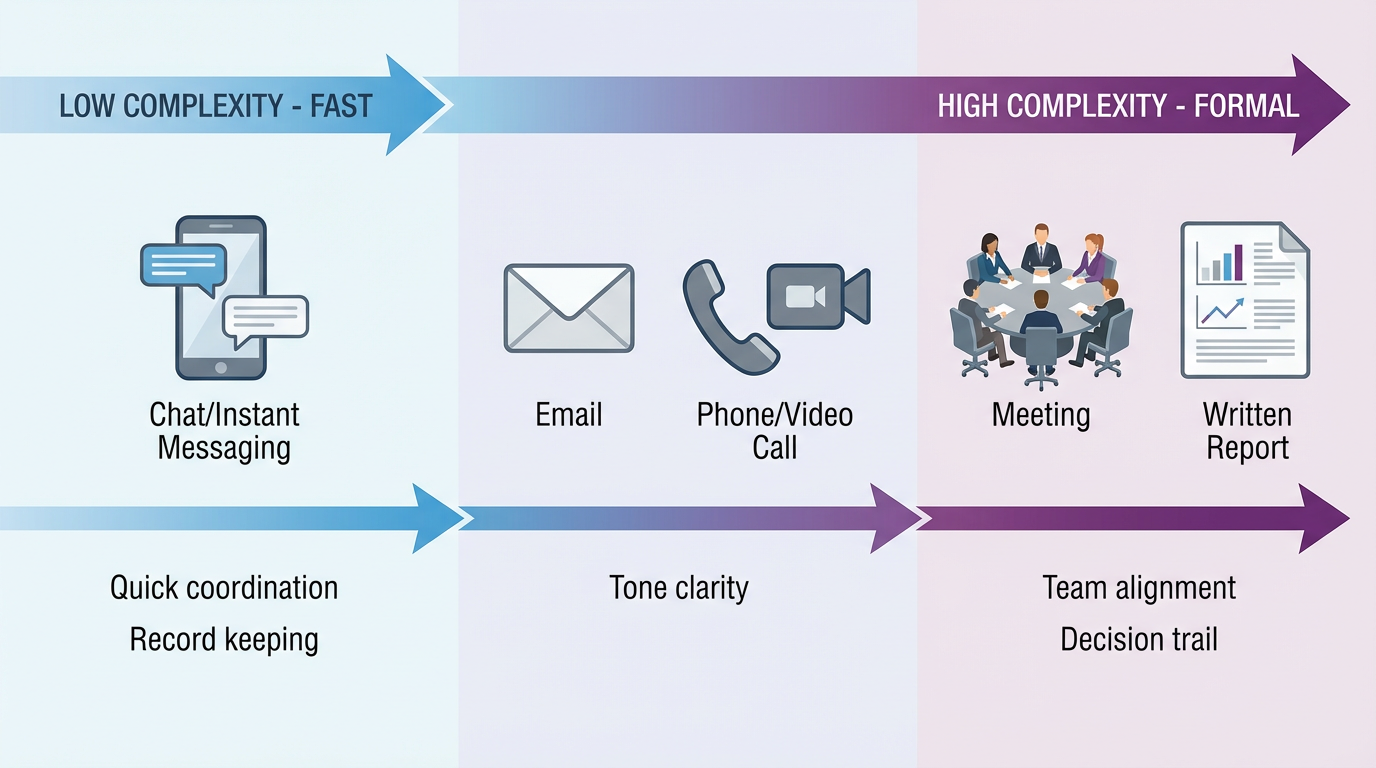
1.4 Choosing the right channel
The channel affects speed, tone, clarity, and risk.
Figure 1.2: Channel Selection Spectrum—matching communication method to complexity and formality needs.
Quick guidance:
Use chat/IM when: the task is simple and low risk; you need quick coordination.
Use email when: you need a clear record; the request has details or deadlines; the message
may be referenced later.
Use phone/video when: tone matters; confusion is likely; emotions are involved.
Use meetings when: decisions require alignment across people; stakes are high; discussion is
needed.
1.5 A repeatable problem-solving method for any message
Step 1: Define the goal (one sentence).
Bad: "I need to email my manager."
Better: "I need my manager to approve a schedule change without feeling blindsided."
Step 2: Identify the stakeholders.
Ask: Who decides? Who implements? Who might resist? Who needs to be informed?
Step 3: Choose your outcome.
Examples: "Approval by Friday", "Customer accepts replacement", "Conflict is de-escalated".
Step 4: Design your message around the reader.
Readers want: What is this about? Why does it matter? What do you need from me? When is it due? What happens
next?
Step 5: Draft with structure.
Use predictable structure: purpose, key context, request, timeline/deadline, next steps.
Case Study 1: The Forwarded Email Problem Scenario: A student employee emails their supervisor: "I can't work Friday. I have plans. Find
someone else."
The supervisor forwards it to the department lead with: "This is the tone we're getting."
What went wrong? No context, no accountability, tone feels dismissive ("find someone else"), no
help solving the staffing problem.
Improved version (professional + collaborative):
Subject: Friday shift coverage
Hi [Supervisor Name],
I'm not able to work my Friday shift (2–6) due to a scheduling conflict. I'm sorry for the inconvenience. I've
already asked Jordan and Mia if they can swap—Jordan is checking now. If neither can, I can work Saturday
morning or take a closing shift next week to make up the hours. Thanks for working with me,
[Name]
Case Study 2: "We'll handle it" (team confusion) Scenario: A teammate says: "We'll handle the research." Later, no one completes it. Everyone
assumed someone else meant "I will."
Fix: Convert vague language into assignment language. Use: Owner (one person accountable),
Deliverable (what it looks like), Deadline (by when), Definition of done.
Diagram: Clear assignment format
OWNER: Sam
TASK: Find 3 credible sources on competitor pricing
DUE: Wed 6 PM
DONE WHEN: Links + 4-bullet summary per source in the shared doc
Module 1 Supplemental Workbook
Activity 1: Tone Makeover
Revise this message to fit the workplace environment pressures:
"Need that update ASAP. Why haven't you sent it?"
Your revision should include: purpose + clear deadline, neutral/respectful tone, enough context so the
reader knows what "update" means.
Activity 2: Sentence Revision
Revise this sentence to be workplace-ready:
"I need you to send me that thing ASAP because you're holding everything up."
Rewrite using: neutral tone, clear deliverable, real deadline, shared goal.
Module 2: Communicating Across Cultures + Choosing the Right Message Type
Module Overview
In Module 1, you practiced the mindset that workplace writing is judged by results. In Module 2, you add two
major professional skills that separate "good writers" from "effective communicators":
Communicating across cultures (Chapter 3): how to prevent misunderstandings when people
interpret tone, time, directness, authority, and "politeness" differently.
Designing the right type of message (Chapter 4): how to pick the best channel and
format—email, memo, letter, chat, or social media—so your message lands the way you intend.
This module is about reducing "invisible friction." Many communication problems aren't caused by bad
intentions—they're caused by different expectations. You'll learn how to recognize those differences, adjust
your message strategically, and choose a channel that supports your goal.
By the end of this module, you will be able to:
Explain how culture shapes interpretation of tone, directness, and credibility
Identify common cross-cultural miscommunication patterns and fix them
Use practical strategies for clarity, respect, and inclusion in diverse settings
Choose the best message type (email, memo, letter, chat, social post) based on purpose, risk, and audience
Match content + tone + channel to achieve a positive response
Typical work in this module:
Culture "translation" practice: rewrite the same message for different audiences
Channel decision drills: choose the best medium and defend your choice
Scenario responses: pick the best message structure for the situation
Chapter 2: Getting Positive Responses to Your Communication
2.1 What is a "positive response"?
A positive response means your communication produces: cooperation instead of resistance, clarity instead of
confusion, goodwill instead of defensiveness. Even when people can't say "yes," you still want them to say: "I
understand," "Let's work on this," "Here are the options," or "Here's what I can do."
2.2 The Six Levers That Shape How Your Message Lands
In the workplace, people don't react only to what you say. They react to: how much effort it takes to understand
you, whether you respect their time and role, whether your tone threatens their dignity, whether your message
feels fair, and whether they can clearly see the next step.
These six levers are basically your message control panel. You can have a reasonable request, but if you pull
the wrong levers (tone too harsh, vague ask, too informal for the situation), the reader might resist, delay,
ignore, or get defensive.
Think of it like this: Same request + different levers = different outcome
Clarity + Courtesy + You-viewpoint → cooperation
Vagueness + Blame + Wrong formality → resistance
A quick story: Same situation, totally different results Scenario: You need a teammate to fix something ASAP. A student intern (Jay) is working on a
team project at a campus office. A spreadsheet has errors, and the supervisor needs it corrected before a
meeting.
Version A (lever settings: low courtesy, low clarity, low you-viewpoint):
"You messed up the spreadsheet again. Fix it ASAP." What happens: The teammate feels attacked, gets defensive, and replies slowly (or not at all). They might fix
it, but now the relationship is tense. Also: what exactly is wrong? What does "ASAP" mean? The reader has to
guess.
Version B (lever settings: high clarity, high courtesy, reader-centered):
"Hey—quick catch before the 2:00 meeting: I'm seeing totals off in rows 14–20 (looks like the formula didn't
copy down). Could you correct those and re-upload by 1:15 so we have time to double-check? Thanks." What happens: The reader knows exactly what to do, why it matters, and when. No blame. The teammate is more
likely to respond fast because the request is clear and respectful.
Lever 1: You-Viewpoint (Reader-Centered Communication)
You-viewpoint means writing from the reader's perspective: What do they care about? What are they responsible
for? What makes their job easier? What's the benefit (or risk) for them? It answers: "Why is this in my inbox?
Is this my problem? What do I do next? How long will this take?"
Examples: Me-centered → You-viewpoint
Me-centered: "I need you to fill out this form for my records."
You-viewpoint: "Completing this form ensures your request is processed without delays."
Me-centered: "I need the report today."
You-viewpoint: "If I can get the report by 4 PM today, we'll be ready for tomorrow's meeting."
Quick caution: You-viewpoint is not fake positivity or manipulation. It's professional empathy + efficiency.
Lever 2: Conversational Style (Professional, Not Casual)
Conversational style means your writing sounds human: straightforward sentences, normal language, calm tone,
easy to read. It avoids stiff, robotic phrasing or overly formal wording that feels cold. It also avoids slang,
emojis, or excessive exclamation points unless culture supports it.
Examples: Too stiff → Conversational professional
Too stiff: "Pursuant to our prior correspondence, I am writing to inquire..."
Conversational: "Thanks for your message—here's what I can confirm."
Examples: Too casual → Professional
Too casual: "Heyyy just checking in 😅"
Professional: "Hi [Name]—checking in on the status of [item]. Do you have an ETA?"
Lever 3: Right Level of Formality (Match the Situation)
Formality communicates respect + seriousness. If you're too informal in a high-stakes situation, you look
careless. If you're too formal in a friendly exchange, you look cold.
Lever 4: Courtesy + Positive Effect (Tone that Reduces Resistance)
Courtesy is respectful language that maintains dignity. Positive effect means your message leaves the reader
feeling respected, informed, and able to act. Courtesy prevents defensiveness and power struggles.
Examples: Blame tone → Solution tone
Blame: "You didn't send the report like you were supposed to."
Solution: "I don't see the report in the folder yet—can you share it by 3 PM so we stay on schedule?"
Courtesy tools: "Thanks for...", "Just checking...", "To stay on schedule...", "Could you...",
"I don't see..."
Lever 5: Bias-Free Language (Inclusive + Precise)
Bias-free language avoids wording that stereotypes, excludes, or labels people in ways that reduce respect or
accuracy. It protects professionalism, workplace belonging, and organizational risk.
Better choices: "everyone/team/all" instead of "guys"; "unexpected/unconventional" instead of "crazy idea";
"staffing/workforce" instead of "manpower".
Lever 6: Clarity (The Hidden Superpower)
Clarity means the reader can quickly answer: What is this about? What do I need to do? When is it due? Where do
I find the info? What happens next?
The 5-line email structure:
Purpose: I'm writing about...
Context: Here's what you need to know...
Request: Please do...
Deadline: By...
Next step: After that, we will...
Putting it all together: "Lever Mix" templates Template 1 (Friendly request): "Hi [Name]—quick request: could you [task] by [time/day] so we
can [shared goal]? Thanks!" Template 2 (Correction without blame): "I may be missing something—I'm seeing [issue]. Could
you double-check [specific area] and update it by [deadline]?" Template 3 (Follow-up): "Hi [Name], checking in on [item]. Do you have an ETA? If it's easier,
I can adjust the timeline—just let me know what works." Template 4 (Firm but respectful): "To meet the deadline, we'll need [deliverable] by [time]. If
that timing isn't workable, please tell me by [earlier time] so we can adjust the plan."
Chapter 3: Communicating Across Cultures
3.1 Culture Is a "Meaning System," Not a Stereotype
When people hear the word culture, they sometimes think of surface-level differences—food, holidays, clothing,
or accents. But in workplace communication, culture matters most because it shapes meaning: how people interpret
tone, intent, respect, competence, and credibility.
Culture influences what people interpret as respectful vs rude, confident vs arrogant, efficient vs careless,
honest vs embarrassing, and cooperative vs weak.
Narrative: "The Same Email, Two Different Interpretations" Scenario: Nina is a student intern working on a project with two supervisors from different
departments. She sends the same update to both. "Hi! I finished the draft. Let me know if you want changes."
Supervisor 1's interpretation (positive): Works in informal/friendly culture. Interprets Nina's
tone as cooperative, efficient, ready to take direction. Supervisor 2's interpretation (negative): Works in formal/structured culture. Interprets Nina
as vague ("What draft?"), incomplete ("No deadline?"), and careless ("Let me know if you want changes" sounds
uncritical).
How Nina could revise for clarity across cultures:
"Hi [Name], the updated draft is uploaded to the shared folder (File: EventPlan_Draft2). I incorporated the
changes from Tuesday's meeting and clarified the schedule section. Could you review and send any edits by
Thursday at noon? Thank you."
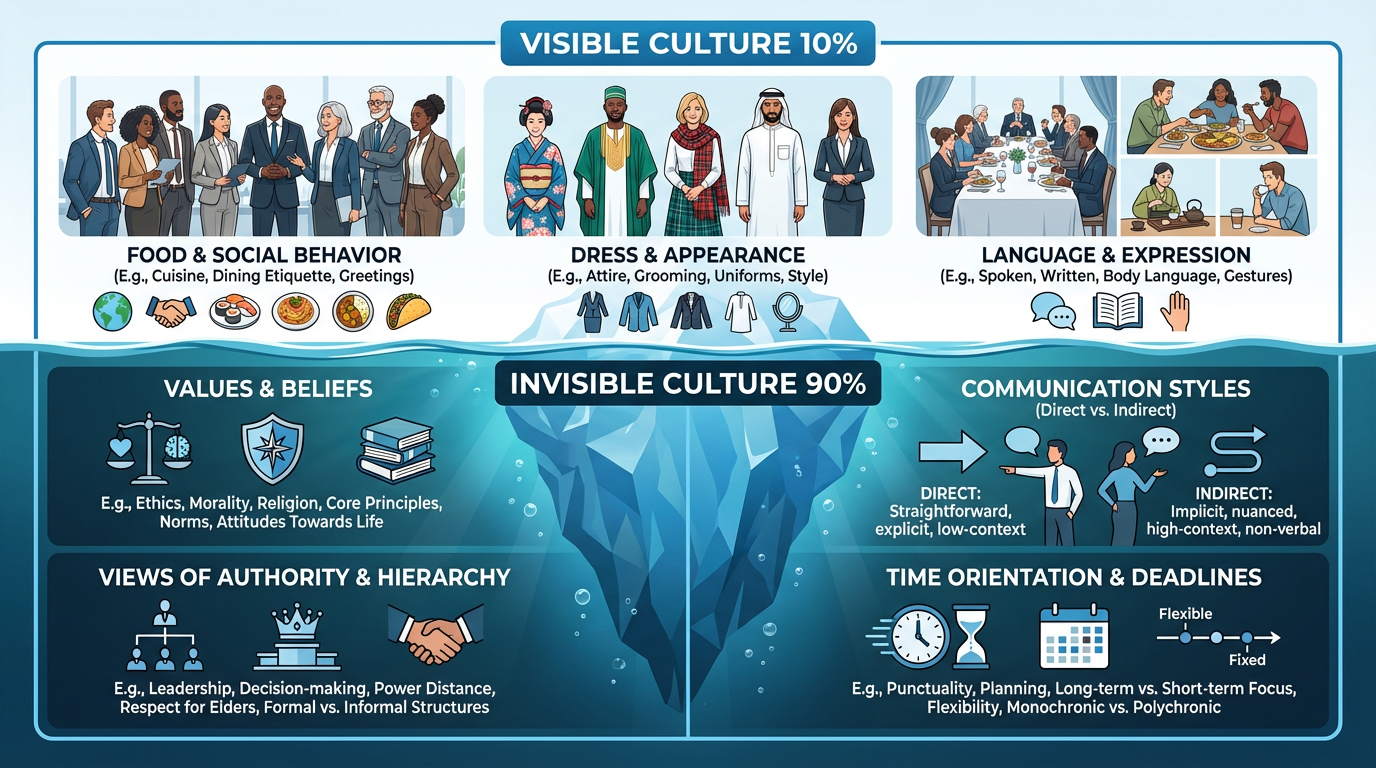
Figure 2.1: The Culture Iceberg. Only 10% of culture is visible—90% of workplace conflicts come from invisible cultural assumptions about communication style, authority, time, and values.
3.2 The "big four" cultural pressure points in workplace messages
A) Directness vs Indirectness: Some cultures value direct clarity; others value face-saving
and softened requests. Professional move: Use clear requests + respectful softening.
B) Power Distance (Views of Authority): In some workplaces, "challenging a manager" feels
disrespectful; in others, asking questions shows engagement. Professional move: Ask questions in a respectful
structure.
C) Time Orientation: Some treat deadlines as firm commitments; others as targets.
Professional move: Specify exact expectations ("By Friday at 2 PM Eastern").
D) Context Level (High vs Low): Low-context: meaning is in words (explicit). High-context:
meaning is in relationships (implicit). Professional move: When in doubt, be clear but keep it warm.
3.3 Story Case Study: "The Feedback That Backfired"
Scenario: A project lead sends feedback: "This section is confusing. Rewrite it. Your tone is
too emotional." The sender intends efficiency. The receiver feels publicly criticized and disrespected. They
withdraw.
What went wrong? Direct criticism without cushioning, "Emotional" labels the person, no clear
revision guidance.
Improved version: "Thanks for drafting this section. I want to make sure readers can follow it
quickly. Could you revise paragraph 2 to clarify the main point in the first sentence, and tighten the last
paragraph by removing repeated ideas? If you'd like, I can mark suggested edits."
3.4 Practical strategies for cross-cultural clarity
Use "plain language" by default: short sentences, common words, fewer idioms.
Separate facts from interpretations: prevents accidental blame.
Confirm meaning with a one-line recap.
Choose inclusive, bias-free language.
Chapter 4: Designing the Right Type of Message: From Letters to Social Media
4.1 The Channel You Choose Is Part of the Message
In business communication, what you say matters—but where and how you say it can matter just as much. The
channel you choose (chat, email, phone, meeting, memo, social media) sends its own message about seriousness,
urgency, tone, expectations, and accountability.
Channel Richness: How much meaning a channel can carry. High richness channels (phone/video)
carry tone and allow clarification. Low richness channels (email/memo) are better for records and details.
Narrative: "The Same Message, Two Channels, Two Outcomes" Scenario: Chris missed a deadline. Dana needs to address it. Version A (Email - Wrong Channel): Dana writes "You missed the deadline again. This is a
serious issue. Explain why." Chris reads it as accusatory/threatening. Result: defensiveness and conflict. Version B (Call first - Right Channel): Dana messages "Do you have 5 minutes for a quick call?
I want to reset the plan after today's deadline miss." On the call, Dana calmly discusses facts, impact, and
plan. Then Dana documents the plan by email. Outcome: Problem solved, relationship intact.
The "Right Channel" Rule: High emotion, conflict, or complexity → richer channel first (then
document).
4.2 Match the Message Type to the Goal
Narrative: "One Task, Five Channels—Five Different Outcomes"
Scenario: Taylor is a student employee helping run a campus event. Taylor needs to match message type to
goal.
Goal 1: Quick coordination → Chat/IM ("Quick check—do we have 6 tablecloths?") Goal 2: Instructions + deadlines → Email ("To stay on schedule, please complete by 5 PM...") Goal 3: Internal policy/update → Memo-style email ("New Procedure for Supply Checkout") Goal 4: External professionalism → Formal email/Letter ("Confirmation of delivery details") Goal 5: Public reputation → Social media post ("Update: Tonight's event begins at 7:30 PM") Goal 6: Complex decision → Report/Proposal (Summary, Options, Recommendation)
4.4 Story Case Study: "The Wrong Channel"
Scenario: Jordan is a team lead. The group missed three deadlines. Jordan is frustrated and
types in group chat: "This is the third time this week. Fix it."
What went wrong: Group chats are public spaces (embarrassment), short messages amplify tone
risk (sounds harsh/vague), messages can travel (screenshots).
Better approach: Private message to clarify → Short call if tone/emotion is high → Follow-up
email to document plan.
Module 2 Supplemental Workbook
Activity 1: Channel Decision Matrix
For each situation, choose the best channel (Email, Chat, Phone, Meeting) and explain why.
1. You need to tell a teammate they made a major error that will cost money.
2. You need to send the agenda for next week's meeting.
Activity 2: Cultural Translation
Rewrite this direct message to be more indirect and face-saving for a high-context culture:
"This data is wrong. Fix it by 5 PM."
Module 3: Visual Messages + Clear Writing
Module Overview
In the workplace, your reader is often moving fast—scanning between meetings, switching tasks, and making
decisions with limited time. That means your message has two jobs: Make meaning easy to see (visual
communication) and make meaning easy to understand (clear writing).
By the end of this module, you will be able to:
Design messages that are easy to scan and hard to misunderstand
Choose the right visual format (table, chart, diagram, slide, infographic) for the goal
Avoid misleading visuals and create ethical, reader-friendly visuals
Write clear, concise sentences with appropriate emphasis and tone
Build coherent paragraphs that guide a reader to the intended takeaway
Figure 3.0: Visual communication in practice—clean layout and organized information for better
comprehension.
Chapter 5: Communicating Your Messages Visually
5.1 Visual communication is not decoration—it's meaning
Many students think visuals are "extra." In professional communication, visuals are part of the message because
they control what the reader notices first, what feels urgent, and what gets ignored.
How readers actually read: 1) Subject line/title, 2) Headings, 3) Bullets/bolded phrases, 4)
First sentence of paragraphs, 5) Visuals.
Narrative: "The Email That Cost an Extra $2,000" Scenario: A supervisor sends a long email with no bullets. The order list is buried. Riley
scans quickly and misses one line: "Order the premium signage package, not standard." Riley orders standard. The
signs arrive wrong. Reprinting costs extra fees.
What went wrong? Visual structure.
Better version:
Subject: Event supplies order (please place by Wed 2 PM)
Hi Riley,
Please place the supply order by Wed 2 PM. Here's the list: Order (use PREMIUM signage package):
* 10 table tents (premium package)
* 2 vinyl banners (premium package)
Delivery: Friday by noon to Student Center Desk.
5.3 Choosing the right visual tool for the job
Figure 3.1: Visual guide to chart selection with actual examples of line charts, bar charts, and tables.
5.4 Case Study: The Misleading Chart Problem (Ethics + Credibility)
Scenario: A student team makes a chart showing "Sales doubled!" but the y-axis starts at 95
instead of 0, making a small change look massive.
Result: The audience feels manipulated. The team loses credibility.
Fix (ethical visual communication): Use honest scales, label clearly, avoid "visual tricks",
state the takeaway in a sentence.
Chapter 6: Crafting Effective Sentences and Paragraphs
6.1 Clear writing is reader support, not "being fancy"
Narrative: "The One Sentence That Broke the Process"
Student worker writes: "The forms should be sent to administration after they are completed."
Who sends them? Which office? How? By when? Two people assume the other person is doing it. Fix: "After you complete the forms, email them to the Student Affairs Office by Friday at 3
PM."
6.2 Sentence tools that make messages clearer
A) Put the main point early: Before: "Due to several scheduling conflicts..." After: "Please
confirm the revised schedule..."
B) Prefer active voice for responsibility: Before: "The report was not submitted." After:
"The report wasn't submitted, so we can't finalize the proposal."
C) Cut filler phrases: Before: "I am writing to inform you that..." After: "Here's the
update..."
6.3 Paragraphs should "guide the reader," not dump information
A strong workplace paragraph usually has: 1) Point (main idea), 2) Support (key details), 3) Action (what
happens next).
Module 3 Supplemental Workbook
Activity 1: De-cluttering
Shorten this sentence to fewer than 10 words without losing meaning:
"At this point in time, we are of the opinion that the meeting should be cancelled due to the fact that
the data is not ready."
Activity 2: Visual Formatting
Sketch or describe how you would format a grocery list of 15 items categorized by department (Produce,
Dairy, Dry Goods) to make it skimmable.
Module 4: Positive Routine Messages
Module Overview
Most workplace messages aren't dramatic—they're routine. But routine messages still matter because they shape
your reputation. In this module, you'll learn how to write professional messages that request information,
respond clearly, confirm details, and build goodwill.
By the end of this module, you will be able to:
Write clear requests that get faster, better responses
Write helpful responses that anticipate reader questions
Confirm information accurately (dates, expectations, next steps)
Write goodwill messages that build relationships and professionalism
Routine Strategy: The Direct Approach
Routine messages build your reputation. The key is the "Direct Approach": State the main idea first, followed by
details, and close with goodwill.
Direct Request Pattern:
1. Main Idea: Please send the Q3 report.
2. Details: I need the sales figures for the board meeting.
3. Closing: Thanks for helping us prepare.
Module 4 Supplemental Workbook
Activity 1: The Request Email
Draft a short email to a colleague asking for their slides for a presentation next Tuesday. Include why you
need them and a deadline.
Activity 2: The Helpful Response
A customer asks, "Do you have this in blue?" Write a response that answers "No" but maintains goodwill
(e.g., offer alternatives, check other stores).
Module 5: Negative Messages and Conflict Communication
Module Overview
This module teaches one of the most valuable workplace skills: delivering bad news without burning bridges.
You'll learn how professionals say "no," communicate disappointment, respond to complaints, and handle conflict
while protecting relationships and credibility.
By the end of this module, you will be able to:
Write refusals and bad-news messages using appropriate structure and tone
Respond to complaints with professionalism and problem-solving language
Communicate boundaries and policy limits respectfully
Reduce conflict using calm, diplomatic wording
Figure 5.0: Professional document review—clarity and structure support difficult conversations.
Delivering Bad News: The Indirect Strategy
When saying "no" or delivering bad news, you often use an Indirect Strategy to prepare the reader. Structure:
Buffer → Reasons → Bad News → Closing.
The "Sandwich" Myth: Don't just hide bad news between fake compliments. Instead, use a neutral
buffer (agreement or appreciation), give the objective reason, state the refusal clearly but gently, and offer
an alternative if possible.
Module 5 Supplemental Workbook
Activity 1: The Refusal
A student organization has asked your company for a $1,000 donation. You have used all your budget for the
year. Write a refusal that maintains goodwill.
Activity 2: De-escalation
Rewrite this defensive response: "It's not my fault you didn't read the manual."
Module 6: Persuasive Communication
Module Overview
In business, you often need buy-in. This module focuses on persuasive writing that is ethical, evidence-based,
and tailored to the reader's priorities. You'll learn how to make persuasive requests and proposals using
benefits, reasoning, and credibility.
By the end of this module, you will be able to:
Write persuasive messages that use benefits and reader-focused reasoning
Build credibility with evidence, professionalism, and tone
Anticipate and address objections respectfully
Use ethical persuasion (no manipulation, no misleading claims)
The AIDA Model
Attention: Hook the reader. Interest: Build a case with facts/details. Desire: Show benefits/proof. Action: Make a specific request.
Figure 6.1: The AIDA Model for persuasive communication - moving from attention to action.
Module 6 Supplemental Workbook
Activity 1: Identifying Benefits
Feature: "This laptop has a 24-hour battery." Benefit (Write it below):
Activity 2: Addressing Objections
You are proposing a 4-day work week. List one major objection management might have, and write a
counter-argument based on evidence.
Module 7: Reports, Research, and Data-Driven Writing
Module Overview
In real organizations, leaders rarely have time to "dig through" research. They need you to: frame the problem
quickly, show what the evidence says (and what it doesn't), make a recommendation they can actually implement,
and present it in a format that's easy to scan.
By the end of this module, you will be able to:
Organize a short report with logical sections and readable formatting
Summarize sources and evidence clearly (without copying)
Write conclusions and recommendations that connect to evidence
Use professional tone and correct citation practices when needed
Figure 7.0: Data-driven communication—transforming research into actionable recommendations.
Turning Information into Decisions
Leaders scan reports. They look for the "So What?" Use the pattern: Finding → Meaning → Action.
Finding: Wait times increased by 20%. Meaning: Customers are frustrated and leaving lines. Action: Hire one part-time cashier for peak hours.
Mini-Report Template (highly usable)
1. Title + date + audience
2. Purpose / Problem statement (1–3 sentences)
3. Background (what led to this)
4. Evidence / Findings (bullets + visuals)
5. Analysis / Interpretation ("what it means")
6. Recommendation (clear, specific, doable)
7. Implementation / Next steps (timeline, owner, cost)
8. Risks / Limits (what might go wrong or what you don't know yet)
9. Sources / Appendix (if needed)
Case Studies + Narratives
Case Study 1: "The Copy-Paste Report That Backfired" Narrative: A student intern pulls stats from a web article and pastes them into a report
without context. The manager asks: "Does this apply to our customers?" The intern can't answer. The report is
ignored. Lesson: evidence must be relevant, interpreted, and connected to the decision.
Case Study 2: "The Great Survey—With the Wrong Conclusion" Narrative: A team surveys 12 people and concludes "most customers want premium options." But 9
of the 12 respondents are already premium buyers. Lesson: small samples and biased sources can mislead.
Case Study 3: "A One-Page Report That Changed a Policy" Narrative: A staff member writes a one-page report about late submissions. They include number
of late assignments, top reasons, one recommended policy change, and a simple timeline. Administration adopts
the change because the report is easy to scan. Lesson: clarity + structure increases influence.
Module 7 Supplemental Workbook
Activity 1: Executive Summary Drafting
Draft a 3-sentence executive summary for a report recommending a new coffee vendor for the office breakroom.
Activity 2: Data Interpretation
Look at this data: "Sales dropped 5% in July but rose 10% in August." Write one sentence interpreting the
trend.
Module 8: Presentations and Career Communication
Module Overview
In the workplace, your success depends on more than having good ideas—you have to communicate them in a way
that people understand and trust. This final module focuses on high-impact professional communication in two
areas:
Presentations: turning information into a clear message for an audience, using strong
structure, confident delivery, and slides that support (not distract from) your point.
Career Communication: polishing the documents and language you use to represent
yourself—résumé bullet points, cover letters or emails of interest, and interview-style responses that
communicate your strengths with professionalism.
By the end of Module 8, you should feel more prepared to speak and write with clarity, confidence, and
purpose—whether you are presenting in a meeting or applying for a job.
By the end of this module, you will be able to:
Design and deliver a short professional presentation with a clear purpose and takeaway
Create slide content that is clean, readable, and audience-focused
Write or revise career documents (résumé + cover letter or email of interest) using professional formatting
and strong, specific language
Communicate strengths and experience using confident, professional language in writing and in speaking
Figure 8.0: Professional presentations—clear structure and confident delivery build credibility.
The Big Idea: Professional communication isn't about sounding "fancy." It's about making it
easy for your audience to understand, trust, and act.
Key Concepts and Skills
1) Audience-First Messaging (What they need, not what you want to say)
Professional audiences are usually thinking:
What is this about?
Why does this matter to me/us?
What do you want me to do next?
Your goal: build your message around what the audience needs to know to make a decision. Quick
self-check: If your audience can't repeat your main point in one sentence, your message is too vague.
2) Presentation Structure That Works (Even when you're nervous)
A clear structure makes you sound confident—even if you're not feeling confident yet.
Use this reliable structure:
Hook: a short story, question, or surprising stat
Purpose: what you're doing today
3 Key Points: no more than three main ideas
Evidence/Example: one key piece of support
Recommendation/Takeaway: what you want the audience to think or do
Next Step: what happens now
"Structure beats charisma." You do not need to be a "natural speaker." You need a message that
is organized, focused, and easy to follow.
3) Slide Design: Support the Message (Don't become the message)
Slides should help your audience follow your thinking—not read paragraphs.
Strong slide rules:
One main idea per slide
Big takeaway headline (not just a topic label)
Minimal text (no walls of words)
Simple visuals (charts, icons, comparison tables)
Consistent formatting and spacing
Headline upgrade example:
Weak: "Customer Feedback"
Strong: "Customers want faster service more than new menu items"
The #1 Slide Mistake: If you are reading your slides word-for-word, the slide has too much
text. Slides should contain key points, not the full script.
4) Professional Delivery: Sound Clear, Confident, and Prepared
You'll practice delivery habits that make you sound professional:
Pace: slow down slightly (people process speech slower than you think)
Pause: pause after key points (it signals confidence)
Signposting: "First… Next… Finally…"
Strong ending: a clear takeaway + next step (no trailing off)
5) Career Communication: Show Value with Specific Proof
Career documents aren't just a list of tasks. They are persuasive communication.
What makes résumés strong:
clean formatting (easy to scan)
bullets that show impact, not just responsibilities
keywords aligned to a role (tailoring)
High-impact bullet formula:
Action verb + what you did + result + context/tool (when relevant)
Example upgrade:
Basic: "Helped with social media."
Strong: "Created a weekly social media schedule that increased event sign-ups by 18% in four weeks."
Confidence without arrogance: Professional confidence comes from specific examples and clear
results—not hype.
Typical Work in This Module
1) Short Presentation (Recorded or Live) + Slide Deck
You will create and deliver a short professional presentation with a simple slide deck.
Suggested topics (choose one):
A proposal to improve something (campus/workplace process, service, or event)
A mini "pitch" for a product/program idea
A findings report (what you found + what you recommend)
A short "how-to" training (teach a skill clearly)
2) Career Communication Package
You will submit:
Résumé (revised or newly created)
Tailored message: cover letter or email of interest (your instructor will specify which)
Assignment Requirements
Assignment A: Short Professional Presentation + Slide Deck
Deliverables:
Slide deck (6–10 slides)
Presentation delivery (Option A: recorded video OR Option B: live presentation if assigned)
Presentation time:
Recorded: 3–6 minutes
Live: 5–8 minutes (if applicable)
Your presentation must include:
A clear purpose and main takeaway
A logical structure (hook → points → evidence → takeaway → next step)
At least one piece of support (example, comparison, small chart/table, or brief evidence)
Slides that are readable and not text-heavy
A clear final recommendation or "what I want you to do next"
Your goal: Your audience should walk away able to answer: "What is the point, and what should
we do next?"